


Word Nature Seasons
4.982.00 Reviews
App Specs
- Version
- 0.26.0
- Updated On
- License
- Free
- Downloads
- 100,000+
- Developer
- Mad Brain Games LTD
- Categories
- Word
- Platform
- Android
Screenshots
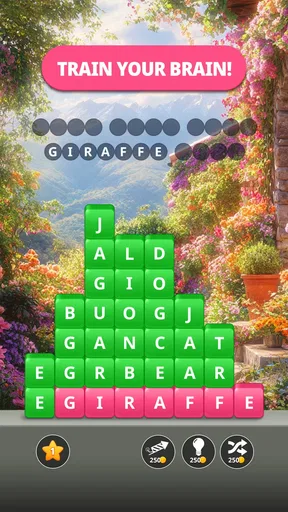
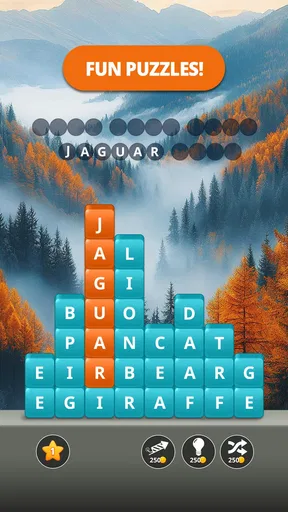
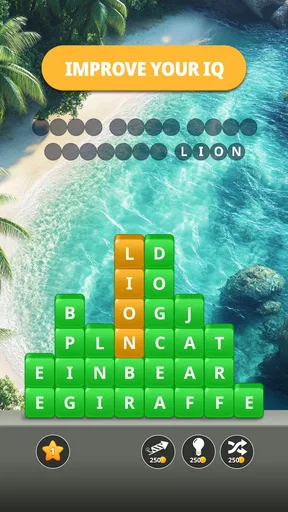

 Analysis by AppCompare
I spent time with Word Nature Seasons as a calm, nature-themed word puzzle game, and its biggest appeal became clear quickly: it is designed for short, low-pressure sessions rather than dramatic competition or complicated strategy. The presentation points toward seasonal exploration, while the core activity asks you to slow down, look at letters carefully, and build words at your own pace. That makes it an easy game to pick up when I want something quieter than an action title.
It is a free game from Mad Brain Games LTD, available to an Everyone audience. The current version is 0.26.0, and the game requires an operating system version of 10 or newer. Its average rating is 4.9 from around 2.5 thousand ratings, with over 100 thousand installs, so there is already a noticeable audience behind it. Those figures do not replace personal experience, but they do suggest that the relaxed word-puzzle formula is connecting with players.
How Word Nature Seasons feels in everyday use
I find that Word Nature Seasons fits best into small pockets of the day, when I want to focus on words without turning a break into a demanding task. In this section, I look at how its quiet, flexible feel can shape a routine, then turn to the choices that make a short puzzle session satisfying rather than repetitive.
A gentle start that suits quick sessions
My first impression was that this is the kind of game I can open without preparing myself for a long commitment. A short word puzzle works well during a coffee break, while waiting for an appointment, or at the end of the day when I want to use my attention without exhausting it. The nature setting helps separate it from the plain grids and stark menus found in many traditional word games.
The relaxed tone is important because the game is not trying to compete with fast arcade titles. I would not choose it when I want action, immediate rewards, or a strong sense of danger. I would choose it when I want a small mental exercise with a softer atmosphere. That distinction also explains why the game may feel too restrained for players who need constant novelty or a demanding competitive ladder.
In a typical everyday scenario, I could play a few puzzles while taking a break from work, stop when my attention drops, and return later without feeling that I have abandoned a major multiplayer match. That flexibility is one of its practical strengths. It turns the game into a pocket activity rather than an appointment.
Speed expectations and the feel of the interface
Word puzzles naturally place more emphasis on thought than reflexes, and this game follows that expectation. The useful question is not whether it behaves like a high-speed action game, but whether it gets out of the way while I am considering a word. In my experience, the nature-focused design supports a slower rhythm: I can examine the available letters, test an idea, and continue without the pressure of a countdown dominating the session.
Worth Reading Before You Choose

EA SPORTS FC Mobile 26 Is a Bigger Football Game, but It Takes Time

Flipboard Shows What News Apps Must Do Beyond the Feed

Switching to Android Auto Means Rethinking Your Driving Routine

Google Calendar Makes a Crowded Week Easier to Manage

Ludo King Makes the Most of the Minutes Between Plans

Baby Panda World Brings Quick Play to Modern Phones, but Its Game Library Feels Busy
That slower pace can be a genuine advantage on devices that are not built for demanding three-dimensional games. A word game generally asks less from the processor and graphics hardware than a large action or racing title, and the simple format makes it a sensible choice for casual play. Still, I would avoid promising identical smoothness on every phone or tablet. Device age, available storage, background activity, and the operating system can all affect how any game opens and responds.
One useful habit is to close demanding apps before a longer puzzle session if the device already feels sluggish. That is not a special requirement of this title; it is simply a practical way to give a lightweight game the best chance of responding cleanly. Players who care about instant transitions should also keep their device reasonably maintained rather than judging the game solely through a crowded or aging system.
What happens during heavier use
The most demanding moments are likely to come from extended play rather than from a single puzzle. If I keep returning to the game for a long stretch, the device may have more work to do than during a brief check-in, particularly if other applications remain active. A nature-themed visual style can also make the screen feel more animated or decorative than a basic word grid, even though it is still far less demanding than a modern action game.
For me, the sensible way to use it is in focused blocks. I can play several rounds, pause, and let the phone return to its normal state instead of treating a casual word game as something that must run continuously. This approach is especially useful on older hardware, where heat, battery drain, and background memory pressure are more noticeable across any extended session.
There is also a mental version of heavy use. Word puzzles can become tiring when I keep forcing answers after my concentration has faded. The game works better when I treat a difficult board as a reason to pause rather than as a challenge to grind through. That is a small but meaningful trade-off: its calm design encourages patience, yet players who prefer constant momentum may find that patience less satisfying.
Reliability and returning to a puzzle
A casual puzzle game needs to feel dependable because people often open it in small windows of free time. I value being able to return to a game without rebuilding a complicated setup, and the straightforward nature of this title makes that expectation reasonable. At the same time, I would keep my expectations realistic around recovery. Any mobile game can be interrupted by a phone call, an operating-system event, low memory, or an accidental swipe away from the app.
My practical advice is simple: if I have just completed an important section or reached a point I do not want to lose, I avoid force-closing the game immediately. I also make sure the device has enough free space and is not struggling with many open applications. These habits cannot guarantee recovery in every situation, but they reduce avoidable interruptions and are particularly useful for anyone playing on an older device.
The version number, 0.26.0, also tells me that the game is still at a relatively early stage of its version history. That is not automatically negative. It can mean the experience is being refined over time, but it also makes me more cautious about expecting every part of the game to feel as mature as a long-established word-puzzle series. Players who dislike change may prefer a more settled alternative, while those comfortable with ongoing refinement may enjoy watching the experience develop.
Device limits and operating-system requirements
The minimum operating-system requirement is version 10, which gives players a clear first check before installing. If a phone or tablet is below that requirement, this is not the right match unless the device is updated. For compatible devices, the more relevant questions are available storage, battery condition, screen size, and general system health.
A larger screen can make letter-based puzzles easier to inspect, especially for players who prefer not to tap small targets or who have visual fatigue after a long day. On a compact phone, the game may still be convenient because it fits naturally into one-handed, short-session use, but the trade-off is that the board can feel more cramped. I would choose a tablet or larger phone for relaxed evening play and a smaller phone for quick breaks.
Battery expectations should also be sensible. A word game is normally a gentler choice than a graphically intensive title, but battery use depends on brightness, network conditions, background processes, and the device itself. I would not install it specifically as a battery-saving tool. I would install it because its puzzle format is less demanding in spirit and usually more suitable for casual play than a visually heavy game.
Where it stands beside familiar word-game alternatives
Compared with a classic crossword app, Word Nature Seasons feels more approachable when I want a guided, visual journey rather than a newspaper-style challenge. Crosswords often reward broad knowledge, clue interpretation, and a willingness to work through a large grid. This game is a better fit when I want the act of forming words to remain central and the atmosphere to feel lighter.
Compared with a daily word game, it offers a different relationship with routine. A daily format creates a shared habit and a clear reason to return once per day, while a seasonal nature setting is more suitable for players who want to play according to their own schedule. If I enjoy comparing one daily result with friends, a dedicated daily game may be the stronger choice. If I want several relaxed sessions without waiting for tomorrow, this title makes more sense.
Compared with competitive word games, it should appeal to people who dislike timers, rankings, or pressure from other players. That is also its limitation. Someone who improves through head-to-head matches may find the experience too quiet. The game’s value is in its calm pacing and accessible theme, not in creating a high-stakes contest.
Useful ways to get more from the puzzles
I found that the best approach is to begin with the most obvious short words instead of staring at the entire letter set at once. Short answers can reveal patterns, reduce visual clutter, and make longer possibilities easier to notice. This is more effective than repeatedly guessing the same familiar word because it turns the board into a process of elimination.
Another helpful habit is to change the way I scan the letters. I might first look for common beginnings, then inspect possible endings, and finally search for less obvious combinations. If I keep reading from left to right in the same order, I tend to miss alternatives. A nature-themed game may feel leisurely, but a deliberate scanning method makes the session more satisfying and reduces unnecessary frustration.
I also recommend stopping before the game becomes work. The relaxed atmosphere is strongest when I use it as a short reset. If I am stuck and no longer enjoying the search, switching tasks for a few minutes is better than tapping randomly. When I return, the answer often becomes easier to see because I am no longer forcing the same mental path.
For families, the Everyone rating makes the game suitable for a broad age range, but younger players may still benefit from playing alongside an adult who can discuss spelling and vocabulary. That turns a quiet puzzle into a small learning activity without making it feel like homework. Adults who want a completely private, skill-based challenge may prefer a more advanced word game with deeper clue systems.
Free access and the cost question
The game is free to download, which lowers the barrier to trying its particular style of word puzzle. There are in-app purchases ranging from $0.49 to $99.99 per item. That is the main point I would discuss with anyone who shares a device with children or wants to keep mobile spending tightly controlled.
I would approach the purchase system deliberately rather than tapping through automatically. A free starting point is useful for deciding whether the pace, visual style, and puzzle structure actually suit me. If I already know I dislike slow word games, spending money will not solve that mismatch. If I enjoy the core experience, I can then decide whether any optional purchase is worth it for my own habits.
The wide purchase range also means different players may experience the game differently depending on what they choose to buy. I would not treat optional spending as part of the basic reason to install it. The stronger case is the free entry point and the ability to test the game before committing financially.
Who should install it, and who should skip it?
I would recommend it to players who want a peaceful word game, enjoy nature-inspired presentation, and prefer flexible sessions over competitive pressure. It is particularly well suited to someone looking for a screen activity during commutes, breaks, or quiet evenings, provided the device meets the operating-system requirement.
I would be more cautious recommending it to players who need complex clues, multiplayer competition, rapid action, or a highly established long-term system. A serious crossword fan may want more demanding clue construction. A competitive word-game player may miss live opponents. Someone with an older unsupported device will need another option altogether.
I would also skip it if I am trying to avoid all in-app purchase prompts or if I want a game with a clearly fixed one-time cost. The free price makes trying it easy, but the presence of optional items means it is worth deciding in advance how I want to handle spending.
My performance verdict after using it
Word Nature Seasons works best when I judge it by the experience it is aiming for: calm word puzzles with a seasonal, nature-focused mood. It is not a substitute for a competitive word arena or a demanding crossword collection, and players should not approach it expecting either. Its appeal comes from the combination of accessible word play, short-session flexibility, and a softer presentation.
From a performance perspective, the format should be a sensible match for casual devices compared with graphically intensive games, while the operating-system requirement gives a clear compatibility boundary. I would still allow for differences between phones, especially during long sessions or when the device is already under pressure. Keeping the system updated, closing unnecessary apps, and pausing between extended sessions are practical ways to improve the experience.
My final view is positive but specific: this is a good choice for relaxed, low-pressure word practice, not for players chasing speed or competition. The free entry point makes it easy to test, the Everyone rating broadens its audience, and the nature theme gives it a more restful identity than many standard word games. If that mood matches what I want from a mobile game, I would gladly keep it available for quiet breaks. If I need deeper clues, social rivalry, or a completely fixed purchase model, I would look elsewhere.
Pros
- Relaxing word puzzles with a calm seasonal atmosphere.
- Simple controls make it easy to play on phones and tablets.
- Gradual difficulty provides a comfortable learning curve.
- Short levels fit well into quick breaks or daily play.
- Offline access lets you enjoy puzzles without a constant connection.
Cons
- Some puzzles may feel repetitive after extended sessions.
- Later levels can become frustrating without hints.
- Hint systems may be limited or require in-game resources.
- The seasonal theme may not appeal to every word-game fan.
- Replay value is modest once the available puzzles are completed.
FAQs for Word Nature Seasons
What is Word Nature Seasons?
Word Nature Seasons is a relaxing word puzzle game that combines vocabulary challenges with peaceful nature-themed scenery. Players typically solve word levels by connecting or arranging letters, while progressing through seasonal environments. The game is designed for casual play, making it suitable for short sessions, although later puzzles can become noticeably more demanding and may require careful thinking or the use of hints.
How do you play Word Nature Seasons?
The main gameplay revolves around discovering words from the letters provided on each level. You can usually tap or swipe across letters to form valid words, complete the puzzle, and move forward through the seasonal map. Some levels may include bonus words or additional objectives. Paying attention to common prefixes, suffixes, and shorter words is helpful when the obvious answer is not immediately visible.
Is Word Nature Seasons free to download and play?
Word Nature Seasons can generally be downloaded for free, allowing players to try its core puzzles without paying upfront. However, free versions of word games may include advertising, optional purchases, or consumable hint packs. Before downloading, it is worth checking the store listing for the current pricing details, in-app purchase information, and whether advertisements can be removed through a paid option.
Does Word Nature Seasons require an internet connection?
An internet connection may be needed for downloading the game, displaying advertisements, synchronizing progress, or accessing certain promotional features. Basic puzzle gameplay may work offline, but this can vary depending on the version installed and the device being used. If offline access is important to you, test the game in airplane mode after installation and avoid assuming that every feature will remain available.
Is Word Nature Seasons suitable for children and casual players?
Word Nature Seasons is generally appropriate for casual players who enjoy vocabulary games, relaxing visuals, and gradual progression. It can also be useful for practicing spelling and recognizing word patterns, although the difficulty and vocabulary may not be designed specifically for young children. Parents should review the listed age rating, advertising content, privacy information, and in-app purchase settings before allowing children to play independently.


